

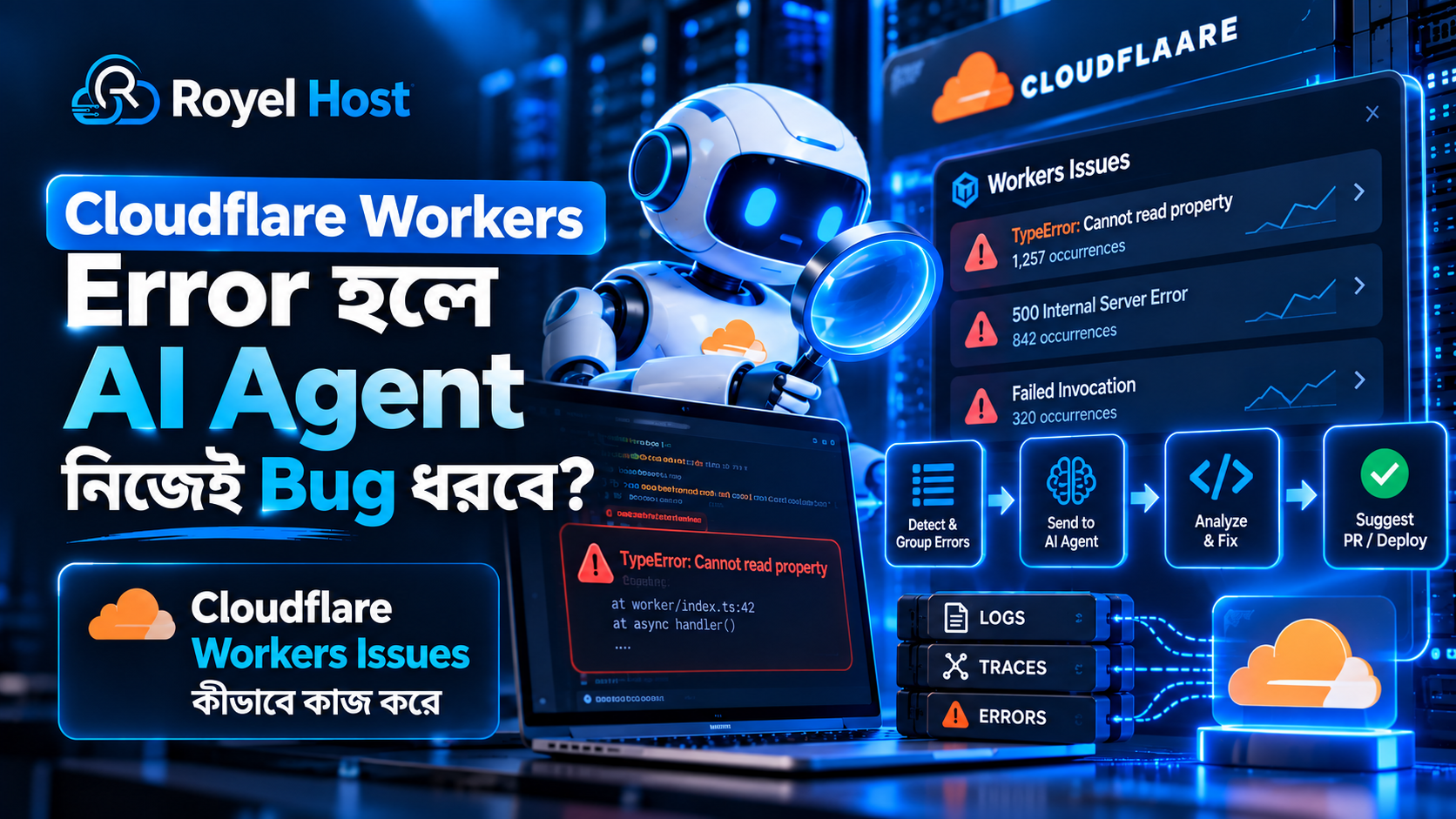
Cloudflare Workers Error হলে AI Agent Bug ধরবে? নতুন Issues Feature কীভাবে Debugging ও Fix Workflow বদলাচ্ছে
Production Website বা Application-এ Error হওয়া নতুন কিছু নয়।
কিন্তু Developer-এর আসল সমস্যা অনেক সময় Error হওয়া নয়—হাজার হাজার Log-এর মধ্যে আসল Bug কোনটা, সেটা দ্রুত খুঁজে বের করা।
ধরুন একটি Cloudflare Worker-এ একই Bug-এর কারণে কয়েক ঘণ্টায় 5,000 বার 5xx Error হয়েছে।
Traditional monitoring system হয়তো আপনাকে দেখাবে:
- হাজার হাজার Error Log
- Repeated Stack Trace
- Multiple Failed Request
- একই Exception বারবার
- Alert-এর পর Alert
Developer-কে এরপর manually:
Log Search → Stack Trace Read → Trace Compare → Source Code Find → Bug Reproduce → Fix → Test
করতে হয়।
Cloudflare এই workflow ছোট করার জন্য Workers Issues নামে নতুন একটি Observability Feature open beta-তে এনেছে।
এটি repeated production error automatically detect ও group করতে পারে।
তারপর Issue-এর:
- Stack Trace
- Logs
- Traces
- Request Context
- Worker Version
- Occurrence Information
একসঙ্গে Developer-এর সামনে দেখাতে পারে।
আর এখানেই সবচেয়ে interesting অংশ:
এই Issue coding agent-এর কাছেও পাঠানো যায়।
অর্থাৎ future debugging workflow হতে পারে:
Error → Detect → Group → AI Agent Investigate → Code Change Suggest → Test → Pull Request → Human Review → Deploy
কিন্তু এখানে একটি গুরুত্বপূর্ণ বিষয় শুরুতেই পরিষ্কার করা দরকার:
Cloudflare Workers Issues নিজে আপনার Bug automatically fix করে Production-এ deploy করে দেয় না।
এটি problem detect, organize এবং coding agent-এর কাছে relevant context পৌঁছে দিতে সাহায্য করে।
Fix এবং deployment workflow আপনি কীভাবে configure করেছেন তার ওপর depend করবে।
Cloudflare Workers Issues কী?
Workers Issues হলো Cloudflare Workers-এর একটি production error detection এবং investigation feature।
এর কাজ হলো raw observability data থেকে repeated problem identify করে meaningful Issue তৈরি করা।
ধরুন একই Exception 2,000 বার হয়েছে।
তাহলে Developer-এর সামনে 2,000টি আলাদা Log পড়ার পরিবর্তে একটি grouped Issue দেখা যেতে পারে।
সেখানে বোঝা যাবে:
- কী Error হচ্ছে
- কখন প্রথম দেখা গেছে
- কতবার হয়েছে
- Trend বাড়ছে নাকি কমছে
- কোন Worker Version affected
- কোন Stack Trace related
- Relevant Request বা Trace কী
এতে debugging অনেক বেশি structured হয়।
Cloudflare Workers কী?
Cloudflare Workers হলো Cloudflare-এর serverless computing platform।
Developer traditional server manage না করেও Cloudflare-এর global network-এ code execute করতে পারে।
Workers ব্যবহার করা হয়:
- API
- Authentication
- Middleware
- Edge Logic
- Redirect
- Dynamic Website Function
- Backend Service
- AI Application
তৈরি করতে।
যেহেতু Workers Production Application চালাতে পারে, তাই reliable monitoring এবং debugging খুব গুরুত্বপূর্ণ।
Workers Issues কেন দরকার হলো?
Modern application-এর problem হলো:
Data কম নয়—Data অনেক বেশি।
একটি Production Application generate করতে পারে:
- Logs
- Errors
- Request Traces
- Metrics
- Exceptions
Traffic বেশি হলে Data volume huge হতে পারে।
Developer-এর challenge তখন:
“কোন Log Important?”
Workers Issues এই raw data-কে actionable problem-এ convert করার চেষ্টা করে।
একই Bug-এর 10,000 Error—10,000 Alert নয়, এক Issue
Workers Issues-এর সবচেয়ে practical benefit হলো Error Grouping।
ধরুন একটি Worker-এর function-এ একটি Null-related Error আছে।
একই Bug:
10,000 Request-এ 10,000 বার trigger হলো।
Traditional log view-তে আপনি 10,000 Error দেখতে পারেন।
কিন্তু মূল problem একটাই।
Issues চেষ্টা করবে related occurrence-গুলোকে একই Issue-এর মধ্যে organize করতে।
ফলে Developer বুঝতে পারবে:
“এগুলো আলাদা 10,000 Problem নয়—একটি Bug-এর 10,000 Occurrence।”
Error Grouping কেন এত গুরুত্বপূর্ণ?
একটি Developer Team-এর সবচেয়ে বড় problem হতে পারে Alert Fatigue।
যদি একই Error-এর জন্য:
- Email Alert
- Slack Alert
- Log Entry
- Dashboard Event
বারবার আসে, তাহলে গুরুত্বপূর্ণ নতুন problem miss হওয়ার risk বাড়ে।
Grouping noise কমাতে সাহায্য করে।
Workers Issues কী ধরনের Problem Detect করতে পারে?
Cloudflare Workers Issues মূলত application-level production failure observe করে।
এর মধ্যে থাকতে পারে:
- Uncaught Exception
- Failed Invocation
- HTTP 5xx Response
- Error-level Log
- Stack Trace-related Failure
অর্থাৎ Worker চলাকালীন serious runtime problem হলে সেটি Issue হিসেবে surface হতে পারে।
Uncaught Exception কী?
Code-এর মধ্যে Error হয়েছে কিন্তু application সেটিকে properly handle করেনি।
ফলে execution fail করেছে।
এটি Uncaught Exception।
উদাহরণ হিসেবে:
Application এমন কোনো Object ব্যবহার করতে গেল যা expected ছিল, কিন্তু actual data নেই।
যদি Error handling না থাকে, request fail করতে পারে।
Failed Invocation কী?
Worker execute হওয়ার কথা ছিল।
কিন্তু execution successfully complete হয়নি।
এটি failed invocation হিসেবে count হতে পারে।
Reason হতে পারে:
- Runtime Error
- Exception
- Resource-related Problem
- Application Logic Failure
HTTP 5xx Error কী?
HTTP 5xx সাধারণত Server-side Failure indicate করে।
যেমন:
- 500 Internal Server Error
- 502 Bad Gateway
- 503 Service Unavailable
এরকম response User-এর কাছে গেলে Website/Application broken মনে হতে পারে।
Workers Issues repeated 5xx pattern identify করতে সাহায্য করতে পারে।
Error-level Log কেন গুরুত্বপূর্ণ?
সব Log একই গুরুত্বের নয়।
Application হয়তো:
- Info
- Warning
- Error
level-এর Log তৈরি করে।
Error-level Log serious problem investigation-এর জন্য useful signal হতে পারে।
Issue তৈরি হলে Developer কী দেখতে পারে?
একটি Issue-এর goal হলো Developer-কে context-rich view দেওয়া।
Relevant information-এর মধ্যে থাকতে পারে:
- Error Message
- Stack Trace
- Occurrence Count
- First Seen
- Recent Activity
- Request Context
- Worker Version
- Related Logs
- Related Traces
এগুলো একসঙ্গে থাকলে Developer আর বিভিন্ন Dashboard-এ ঘুরে problem assemble করতে হয় না।
Stack Trace কী?
Stack Trace দেখায় Error হওয়ার আগে Code কোন path দিয়ে execute হয়েছে।
সহজভাবে:
কোন Function → কোন Function → কোন Line → Error
এই chain Developer-কে root cause identify করতে সাহায্য করে।
AI Agent-এর জন্য Stack Trace কেন Valuable?
AI coding agent যদি শুধু:
“Website Error করছে”
এই message পায়, তাহলে খুব কম context আছে।
কিন্তু যদি পায়:
- Error Message
- Stack Trace
- Logs
- Source Code
- Repository
- Recent Change
তাহলে Agent bug reason সম্পর্কে অনেক ভালো analysis করতে পারে।
Workers Issues থেকে AI Agent-এর কাছে কী যায়?
Configured automation অনুযায়ী Issue-এর relevant context coding agent বা external automation endpoint-এর কাছে পাঠানো যেতে পারে।
এর ফলে Agent জানতে পারে:
কোন Problem investigate করতে হবে।
তারপর repository access থাকলে Source Code inspect করতে পারে।
AI Agent কি Cloudflare Account নিজে Browse করতে পারে?
Automatically নয়।
একটি Issue Agent-এর কাছে পাঠানো মানেই Agent Cloudflare Account-এর সব Logs, Traces এবং Settings access পেয়ে গেল—এমন নয়।
Agent-এর additional observability data query করার জন্য proper integration এবং permission প্রয়োজন হতে পারে।
Observability MCP কীভাবে কাজে আসতে পারে?
MCP বা Model Context Protocol AI agent-কে external tools/data source-এর সঙ্গে connect করতে সাহায্য করে।
Observability context expose করা থাকলে Agent:
- Logs Query
- Error Context
- Trace Data
আরও deeply inspect করতে পারে।
কিন্তু permission intentionally configure করা উচিত।
AI Agent কি Bug নিজে Fix করবে?
Potentially code fix propose করতে পারে।
উদাহরণ workflow:
- Issue Agent-এর কাছে গেল
- Agent Stack Trace পড়ল
- Repository inspect করল
- Relevant Function খুঁজল
- Root Cause অনুমান করল
- Code Change করল
- Test লিখল বা Run করল
- Pull Request তৈরি করল
এখান পর্যন্ত automation অনেক শক্তিশালী হতে পারে।
AI Agent কি Production-এ নিজেই Deploy করবে?
এটি configuration-এর ওপর depend করতে পারে, কিন্তু safe workflow-এ:
Human Review → Approval → Deploy
রাখা ভালো।
Cloudflare Workers Issues-এর মূল purpose নিজে autonomous production deployment করা নয়।
Human Review কেন জরুরি?
AI generated Fix technically correct মনে হলেও:
- Business Logic Break
- Security Issue
- Edge Case
- New Regression
তৈরি করতে পারে।
তাই Production Application-এর জন্য Pull Request review useful।
Traditional Debugging vs Agentic Debugging
| Traditional Workflow | Agent-assisted Workflow |
|---|---|
| Alert আসে | Issue automatically তৈরি |
| Developer Log খোঁজে | Relevant Logs grouped |
| Stack Trace manually inspect | Agent context পায় |
| Source Code search | Agent repository inspect করে |
| Fix manually লিখে | Agent fix propose করতে পারে |
| Developer test করে | Agent test run করতে পারে |
| Deploy | Human review-এর পরে deploy |
এখানে Developer disappear করছে না।
বরং repetitive investigation কমছে।
Workers Issues এবং Logs কি একই জিনিস?
না।
Logs = Raw Events
Issues = Grouped Problem
Logs individual event দেখায়।
Issues multiple related event থেকে একটি problem-oriented view তৈরি করে।
Workers Issues এবং Traces কি একই?
না।
Trace একটি Request/Application execution path বুঝতে সাহায্য করে।
Issue একটি broader recurring problem organize করে।
Issue investigation-এর মধ্যে relevant trace link/use করা যেতে পারে।
Monitoring আর Debugging-এর Difference কী?
Monitoring বলে:
Problem হয়েছে।
Debugging বলে:
কেন হয়েছে।
Workers Issues দুইটার মাঝখানে bridge তৈরি করার চেষ্টা করে।
Error Detection থেকে Root Cause পর্যন্ত Gap কমছে
Traditional monitoring অনেক সময় শুধু বলে:
500 Error বেড়েছে।
তারপর Developer manually root cause খোঁজে।
AI-assisted Issues workflow চেষ্টা করছে:
500 বেড়েছে → Same Error Group → Stack Trace → Source Code Context → Suggested Fix
পর্যন্ত journey shorten করতে।
Occurrence Count কী?
একটি Issue কতবার ঘটেছে সেটি Occurrence Count।
এটি severity understand করতে সাহায্য করে।
একবার হওয়া Error এবং 1 লাখবার হওয়া Error-এর priority এক নয়।
Occurrence Threshold কী?
Automation configure করা যেতে পারে যেন specific occurrence threshold cross করলে action trigger হয়।
Conceptually:
Error 1 বার → Ignore
Error 100 বার → Coding Agent-এর কাছে পাঠাও
এরকম workflow তৈরি করা যায়।
Threshold কেন দরকার?
Production Application-এ সব ছোট Error AI Agent-এর কাছে পাঠালে noise আবার বাড়বে।
Threshold meaningful problem prioritize করতে সাহায্য করে।
Recurrence Trigger কী?
ধরুন একটি Error হয়েছিল।
তারপর অনেক সময় আর হয়নি।
Developer ভাবল problem solved।
কিন্তু 3 দিন পরে আবার Error শুরু হলো।
এই ধরনের recurrence-এর ওপর automation trigger করা useful।
“First Seen” কেন Important?
কখন Error শুরু হয়েছে জানলে Developer recent deployment/change-এর সঙ্গে relation খুঁজতে পারে।
যেমন:
Version 10 deploy হলো 2:00 PM।
Issue first seen 2:04 PM।
তাহলে latest deployment suspect করা logical।
Worker Version Information কেন Useful?
যদি multiple version deployed থাকে, Issue কোন Version-এর সঙ্গে related তা জানা গুরুত্বপূর্ণ।
এতে regression identify করা সহজ হয়।
AI Agent কি Git Repository দেখতে পারবে?
Integration অনুযায়ী Agent repository access পেতে পারে।
যেমন coding agent:
- Source File
- Commit History
- Tests
- Configuration
inspect করতে পারে।
Repository access না থাকলে Agent-এর fix capability সীমিত হবে।
Claude Code, Cursor এবং Devin-এর মতো Tool কীভাবে Relevant?
Coding agent-এর goal হলো source code understand করে change propose করা।
Workers Issues-এর automation এই ধরনের agent-এর কাছে issue context hand off করতে পারে।
Agent then repository-level investigation করতে পারে।
Generic Webhook কেন Useful?
সব Team একই coding agent ব্যবহার করে না।
Webhook support থাকলে Team নিজের:
- Internal Agent
- Slack Bot
- Incident System
- Automation Platform
এ Issue পাঠাতে পারে।
Webhook কী?
Webhook হলো event ঘটলে অন্য service-কে HTTP request-এর মাধ্যমে information পাঠানোর mechanism।
যেমন:
Issue তৈরি → Webhook → Internal Bug System
Workers Issues কি SDK Install চায়?
Workers runtime-এর observability capability হিসেবে Issues ব্যবহার করা যায়।
Traditional external error-monitoring platform-এর মতো application-এর ভেতরে আলাদা error-tracking SDK integrate করা সব ক্ষেত্রে প্রয়োজন নাও হতে পারে।
এটি developer workflow simplify করতে পারে।
Existing Website-এ শুধু Cloudflare লাগালেই Issues কাজ করবে?
না।
এটি খুব important।
আপনার Website Cloudflare CDN/Proxy ব্যবহার করছে বলেই Workers Issues আপনার WordPress/PHP errors automatically detect করবে না।
Featureটি Cloudflare Workers application-এর জন্য।
WordPress Website Owner-এর জন্য Directly Relevant?
সাধারণ WordPress Hosting User-এর জন্য directly নয়।
যদি WordPress-এর সামনে বা সাথে Cloudflare Worker-based:
- API
- Middleware
- Edge Function
- Custom Logic
থাকে, তখন relevant হতে পারে।
VPS Website-এর PHP Error কি Workers Issues ধরবে?
Worker-এর বাইরে VPS/PHP application-এর internal errors automatically Workers Issues-এর মধ্যে আসবে না।
তার জন্য Server/Application-specific monitoring দরকার।
তাহলে Royel Host Audience-এর জন্য Topic Relevant কেন?
কারণ Royel Host audience-এর মধ্যে:
- Developer
- Agency
- SaaS Builder
- VPS User
- API Developer
আছে।
Serverless/Edge Application increasingly common হওয়ায় modern observability বুঝে রাখা valuable।
Historical Error কি Automatically Import হবে?
Issues enable করার আগের সব historical error backfill হওয়ার expectation করা উচিত নয়।
Feature enable করার পর নতুন traffic এবং নতুন failures থেকে Issue তৈরি হবে।
তাই Enable করার পরই পুরোনো Bug দেখাবে?
পুরোনো Bug যদি আবার occur করে, তখন নতুন occurrence detect হতে পারে।
কিন্তু historical database automatically reconstruct হবে না।
Open Beta মানে কী?
Cloudflare Workers Issues বর্তমানে Open Beta হিসেবে available।
এর মানে feature publicly test করা যাচ্ছে, কিন্তু future-এ:
- UI
- Behavior
- Limit
- Pricing
পরিবর্তন হতে পারে।
Production workflow design করার সময় Beta status মাথায় রাখা উচিত।
Beta-তে কি Free?
বর্তমান Open Beta period-এ Issues ব্যবহার free।
তবে future pricing permanentভাবে same থাকবে—এমন guarantee করা উচিত নয়।
Automation Limit আছে?
Current beta setup-এ account-level automation limit রয়েছে।
একটি account-এ limited number of Issues automations configure করা যায়।
এই ধরনের platform limit future-এ change হতে পারে।
Recurrence Window Configure করা যায়?
Issue recurrence automation-এর ক্ষেত্রে inactivity window configure করা যায়।
অর্থাৎ error কত সময় quiet থাকার পরে আবার ফিরে এলে “recurrence” ধরা হবে সেটি set করা যায়।
AI Debugging-এর সবচেয়ে বড় Benefit: Context
Developer-এর সময় সবচেয়ে বেশি যায় information collect করতে।
উদাহরণ:
- Error কোথায়?
- কোন Version?
- কোন Request?
- কোন Log?
- কোন Stack?
যদি system আগে থেকেই এগুলো একত্র করে Agent-এর কাছে পাঠায়, investigation dramatically faster হতে পারে।
AI Root Cause কি সবসময় ঠিক ধরবে?
না।
AI Agent:
- Wrong Assumption
- Partial Fix
- Incorrect Dependency Understanding
করতে পারে।
তাই automation confidence-এর সঙ্গে review process রাখা জরুরি।
Example Scenario: API 500 Error
ধরুন একটি Worker API:
/api/order
request handle করে।
New deployment-এর পরে কিছু order request 500 দিতে শুরু করল।
Workers Issues:
- Similar Error group করল
- Stack Trace দেখাল
- Version identify করল
- Logs attach করল
Automation Agent-এর কাছে গেল।
Agent repository inspect করে দেখল একটি required value null হতে পারে।
তারপর validation fix propose করল।
Developer PR review করল।
Test pass।
Deploy।
এটাই ideal agent-assisted debugging workflow।
Example Scenario: External API Timeout
Worker third-party Payment API call করছে।
Provider slow হওয়ায় Error বাড়ল।
AI Agent Source Code দেখে Retry যোগ করতে চাইতে পারে।
কিন্তু Developer বুঝতে পারে Blind Retry Duplicate Payment Risk তৈরি করবে।
এই example দেখায় কেন Human Review এখনও গুরুত্বপূর্ণ।
AI Fix সবসময় Code Change হবে না
কখনো Root Cause Code নয়।
Problem হতে পারে:
- Third-party API
- Configuration
- Secret
- Service Outage
Agent যদি সব problem-এ code change করে, ভুল হতে পারে।
Good debugging system root cause আগে identify করবে।
Logs-এ Sensitive Data রাখা কেন Dangerous?
Coding Agent-এর কাছে Issue পাঠালে related context external system-এ যেতে পারে।
তাই Log-এর মধ্যে sensitive information না রাখাই ভালো।
যেমন:
- Password
- Access Token
- API Key
- Private User Data
- Authentication Header
Production Log-এ Password লেখা উচিত?
কখনোই নয়।
Debugging convenience-এর জন্য credentials log করা বড় security risk।
AI Agent Integration Security কীভাবে করবেন?
Minimum principles:
- Least Privilege
- Limited Repository Access
- Secret Isolation
- Human Approval
- Audit Log
রাখা উচিত।
Least Privilege কী?
Agent-কে শুধু প্রয়োজনীয় access দেওয়া।
Bug fix-এর জন্য repository read/write দরকার হতে পারে।
কিন্তু:
- Billing
- Domain
- Entire Account Admin
access প্রয়োজন নেই।
Production Secret Agent-এর কাছে পাঠানো উচিত?
যতটা সম্ভব avoid করা উচিত।
Agent-এর issue context-এ secret leak না হয় সেটা ensure করা জরুরি।
AI-generated Pull Request কেন Safer?
Agent direct deploy না করে PR তৈরি করলে Team দেখতে পারে:
- কী change হয়েছে
- কেন change হয়েছে
- Test আছে কি না
এতে code review possible হয়।
Automated Test কেন আরও গুরুত্বপূর্ণ হচ্ছে?
AI Agent দ্রুত code change করতে পারে।
Change speed বাড়লে automated test-এর value আরও বাড়ে।
Test না থাকলে:
Fast Fix → Fast Regression
হতে পারে।
Unit Test কীভাবে সাহায্য করে?
Specific Function expectedভাবে কাজ করছে কি না check করে।
Bug fix করার পরে একই bug যাতে ফিরে না আসে, regression test useful।
Staging Environment কি এখনও দরকার?
হ্যাঁ।
AI Agent আছে বলে staging-এর প্রয়োজন শেষ হয় না।
Critical application হলে:
Fix → Test → Staging → Review → Production
workflow safer।
AI Agent Developer-কে Replace করবে?
Workers Issues-এর use-case দেখলে বরং pattern হচ্ছে:
AI Developer Tool
Developer Replacement নয়।
AI repetitive investigation এবং code drafting speed up করতে পারে।
Human এখনও:
- Architecture
- Business Logic
- Security
- Final Review
handle করে।
Small Team-এর জন্য Benefit কী?
Small Team-এর dedicated SRE বা Observability Engineer নাও থাকতে পারে।
AI-assisted issue investigation তাদের response time কমাতে পারে।
বিশেষ করে SaaS/Startup-এর জন্য useful।
Large Team-এর জন্য Benefit কী?
Large application-এ Error volume huge।
Issue grouping এবং automated triage:
- On-call load
- Noise
- Investigation Time
কমাতে সাহায্য করতে পারে।
MTTR কী?
MTTR সাধারণভাবে incident resolve করতে average কত সময় লাগে তা বোঝাতে ব্যবহৃত হয়।
Better detection + context + automated investigation theoretically MTTR কমাতে সাহায্য করতে পারে।
Error Detect দ্রুত হলেই কি Reliability বাড়ে?
Detection একা যথেষ্ট নয়।
Full reliability দরকার:
Detect → Diagnose → Fix → Validate → Deploy
Workers Issues mainly first few stage streamline করতে সাহায্য করে।
Traditional Error Monitoring Tool কি তাহলে দরকার থাকবে না?
এমন conclusion ঠিক নয়।
Existing platforms provide করতে পারে:
- Application Performance Monitoring
- Session Replay
- Mobile Monitoring
- Infrastructure Metrics
Workers Issues Cloudflare Workers-specific workflow improve করছে।
Workers Issues-এর বড় Advantage কী?
Cloudflare Worker runtime-এর কাছেই Observability Data আছে।
তাই Developer extra layer ছাড়াই relevant issue context পেতে পারে।
Cloudflare Workers ব্যবহারকারীর Practical Workflow
- Issues Enable করুন
- Production Traffic Observe করুন
- Repeated Issue Identify করুন
- Stack/Trace Review করুন
- High-priority Issue-এর জন্য Automation দিন
- Coding Agent Connect করুন
- PR Review করুন
- Test করুন
- Deploy করুন
- Recurrence Monitor করুন
কোন Issue Agent-এর কাছে পাঠাবেন?
সব নয়।
Priority:
- Repeated 5xx
- User-impacting Error
- High Occurrence
- New Regression
- Critical API Failure
Low-value noise filter করা ভালো।
Severity কীভাবে Decide করবেন?
Consider করুন:
- কত User affected?
- Revenue impact আছে?
- Error frequency কত?
- Security issue?
- Business-critical endpoint?
E-commerce Application-এর জন্য Example
যদি Checkout-related Worker 5xx দেয়:
Priority high।
কিন্তু analytics background function-এর rare error তুলনামূলক lower priority হতে পারে।
API Business-এর জন্য Example
Authentication Worker Error করলে পুরো product inaccessible হতে পারে।
Issue occurrence কম হলেও severity high হতে পারে।
তাই শুধু count দিয়ে priority decide করবেন না।
Serverless Application কি Error-free?
না।
Server manage না করলেও application logic error থাকতে পারে।
Serverless শুধু infrastructure management model change করে।
Code bug এখনও code bug।
Edge Computing কী?
Application logic User-এর কাছাকাছি distributed network location-এ execute করা।
Cloudflare Workers edge/serverless computing model-এর একটি example।
Edge Debugging কেন Challenging?
Application globally distributed environment-এ execute হতে পারে।
Traditional “একটি Server Log File open করলাম” approach যথেষ্ট নাও হতে পারে।
Centralized observability তাই important।
AI Agent Edge Debugging-এ Useful কেন?
Agent multiple observability signal combine করতে পারে।
যেমন:
Stack Trace + Trace + Repository + Version
একসঙ্গে analyze করা সম্ভব।
Future Debugging কেমন হতে পারে?
আজ:
Developer Error দেখে Fix করে।
Future:
System Error detect করে → AI investigate করে → Fix propose করে → Developer approve করে।
এটিই agentic software operations-এর দিকে বড় shift।
Self-healing Software কি আসছে?
আংশিকভাবে।
Software নিজে problem detect এবং suggested fix generate করতে পারছে।
কিন্তু fully autonomous self-healing Production System এখনও significant risk নিয়ে আসে।
Critical application-এ Human Governance গুরুত্বপূর্ণ থাকবে।
AI Agent ভুল Fix দিলে কী হবে?
তাই rollback strategy দরকার।
Production deployment-এর আগে:
- Test
- Review
- Versioning
থাকতে হবে।
Rollback কী?
নতুন Version problem করলে আগের working version-এ ফিরে যাওয়া।
Reliable deployment system-এ rollback capability গুরুত্বপূর্ণ।
Workers Versioning কেন Useful?
Issue কোন version-এ শুরু হয়েছে জানা থাকলে problematic deployment identify এবং rollback easier হতে পারে।
Error Monitoring Hosting-এর সঙ্গে কীভাবে Related?
Traditional VPS/Hosting Application-এও principle একই:
Website Online আছে = Application Healthy
এটা সবসময় সত্য নয়।
Website response দিলেও backend error থাকতে পারে।
তাই reliable infrastructure-এর পাশাপাশি monitoring দরকার।
Royel Host VPS User-দের Lesson কী?
VPS নিলে dedicated resource/control পাওয়া যায়।
কিন্তু Server নিজে automatically application bug fix করবে না।
VPS user-এরও দরকার হতে পারে:
- Error Logging
- Monitoring
- Backup
- Security
- Resource Monitoring
Fast Server + Broken Code = Broken Application
Hosting Performance important।
কিন্তু code-level error Hosting Upgrade দিয়ে fix হয় না।
ঠিক যেমন:
Low CPU Resource → Hosting issue হতে পারে
কিন্তু:
Null Exception → Code issue
দুটো আলাদা।
500 Error মানেই Hosting Problem?
না।
HTTP 500 হতে পারে:
- Application Bug
- Configuration
- PHP Error
- Worker Exception
এর কারণে।
Root cause investigate করা দরকার।
Developer Agency-এর জন্য Workers Issues কতটা Useful?
Agency যদি multiple Cloudflare Worker application manage করে, repeated production issue triage automate করতে পারে।
Coding Agent Integration developer time save করতে পারে।
SaaS Startup-এর জন্য কেন Interesting?
Startup Team সাধারণত ছোট।
Developer একই সঙ্গে:
- Feature Build
- Support
- Bug Fix
- Deployment
করে।
AI-assisted debugging repetitive workload কমাতে পারে।
কি সব Bug AI-কে দেওয়া উচিত?
না।
Good candidates:
- Clear Stack Trace
- Reproducible Logic Error
- Well-tested Codebase
Hard cases:
- Complex Business Incident
- Security Breach
- Data Corruption
- Payment Logic
এ Human-led investigation বেশি important।
Security Bug AI Automatically Fix করলে Risk আছে?
হ্যাঁ।
Security-sensitive change review ছাড়া merge করা উচিত নয়।
Authentication, authorization বা secret handling-এর change বিশেষভাবে carefully review করা দরকার।
Coding Agent-এর Permission কী হওয়া উচিত?
Ideal workflow:
Read Repository → Create Branch → Change Code → Run Test → Open PR
Production secret বা direct deploy permission সবসময় দরকার নেই।
AI Debugging-এর জন্য Documentation কেন Important?
Well-documented project AI Agent এবং Human দুজনেরই বুঝতে সহজ।
Clear:
- Architecture
- Naming
- Tests
- README
থাকলে Agent better context পায়।
Poor Codebase-এ AI Agent কি Struggle করবে?
হ্যাঁ।
যদি:
- No Tests
- Huge Function
- No Documentation
- Mixed Responsibility
থাকে, AI diagnosis reliability কমতে পারে।
AI-ready Codebase কী?
বিশেষ magic format নয়।
Good engineering practice:
- Small Modules
- Clear Names
- Tests
- Documentation
- Consistent Pattern
AI Agent-এর জন্যও useful।
Workers Issues কি Website Speed Tool?
না।
এটি primarily error/issue observability feature।
Website Speed-এর জন্য:
- Performance Analytics
- Core Web Vitals
- RUM
আলাদা concern।
Workers Issues কি Security WAF?
না।
WAF malicious request block করে।
Issues application error detect করে।
দুটো completely different।
Workers Issues কি Cloudflare Error Pages Fix করবে?
Automaticভাবে নয়।
Origin, Network, DNS বা other Cloudflare-layer errors সব Workers Issues-এর scope নয়।
এটি Worker runtime/application issue-এর ওপর focus করে।
Common Misconception
“Cloudflare এখন সব Website Bug AI দিয়ে Fix করবে”
ভুল।
“Cloudflare use করলেই Feature কাজ করবে”
না। Cloudflare Workers application relevant।
“Issue detect হলেই Fix হয়ে যাবে”
না। Investigation/fix workflow আলাদা।
“AI-generated Fix safe”
Review দরকার।
“500 Error মানেই Hosting Problem”
সবসময় নয়।
Workers Issues-এর সবচেয়ে Interesting Future Impact
এই feature শুধু Error Dashboard নয়।
এটি Software Development Workflow-এর একটি পরিবর্তন দেখায়।
আগে Observability Tool-এর কাজ শেষ হতো:
“Problem এখানে।”
এখন goal হচ্ছে:
“Problem এখানে → এই context নাও → Coding Agent investigate করুক।”
Observability এবং Coding Assistant একসঙ্গে আসছে।
DevOps কি Agentic হচ্ছে?
ধীরে ধীরে।
আগে:
Monitor → Human → Code
এখন:
Monitor → Agent → Human Review → Code
Future DevOps workflow আরও automated হতে পারে।
Website Owner-এর এখন কী করা উচিত?
যদি আপনি normal Website Owner হন এবং Cloudflare Workers application develop না করেন, immediate action প্রয়োজন নেই।
কিন্তু Developer/SaaS/Agency হলে featureটি evaluate করা যেতে পারে।
Cloudflare Workers Developer Checklist
| বিষয় | কী করবেন |
|---|---|
| Issues | Enable/Test |
| Error Logs | Clean রাখুন |
| Sensitive Data | Log করবেন না |
| Stack Trace | Review |
| Automation | Important Issue-এর জন্য |
| Coding Agent | Limited Access |
| Repository | Tests রাখুন |
| Pull Request | Human Review |
| Deployment | Controlled |
| Recurrence | Monitor |
AI Agent Integration Security Checklist
- API/Token limited রাখুন
- Secret Log করবেন না
- Repository Permission সীমিত করুন
- Production Deploy Approval রাখুন
- PR Review করুন
- Audit Trail রাখুন
- Critical Security Change manually inspect করুন
Final Question: Website Error হলে AI Agent নিজেই Bug ধরবে ও Fix করবে?
সঠিক উত্তর:
Partially—এবং controlled workflow-এর মধ্যে।
Cloudflare Workers Issues repeated error detect এবং group করতে পারে।
তারপর:
- Logs
- Stack Trace
- Traces
- Worker Version
- Request Context
সহ Issue coding agent-এর কাছে পাঠানো যায়।
Agent Repository inspect করে Bug identify এবং code fix propose করতে পারে।
কিন্তু:
Issues নিজে Source Code magically fix করে Production-এ deploy করে না।
Safer model:
Detect → Group → Agent Investigate → Fix/PR → Human Review → Deploy
Final Conclusion
Cloudflare Workers Issues-এর সবচেয়ে গুরুত্বপূর্ণ innovation শুধু নতুন Error Dashboard নয়।
এটি Observability এবং AI Coding Agent-এর মধ্যে connection তৈরি করছে।
আগে Developer প্রথমে Error খুঁজত।
তারপর manually context collect করত।
তারপর Source Code locate করত।
তারপর Fix লিখত।
Agentic workflow-এ system আগে থেকেই:
Repeated Error detect → Group → Context Prepare
করতে পারে।
তারপর Coding Agent investigation শুরু করতে পারে।
এর ফলে Developer-এর কাজ পুরো disappear করছে না।
বরং Developer low-value repetitive investigation থেকে বের হয়ে:
- Correctness
- Architecture
- Security
- Review
এর ওপর বেশি focus করতে পারবে।
Cloudflare Workers-এর মতো serverless platform ব্যবহারকারী Developer, Agency এবং SaaS Team-এর জন্য এটি ভবিষ্যৎ Software Operations-এর একটি গুরুত্বপূর্ণ direction।
কিন্তু একটি principle একই থাকবে:
AI যতই smart হোক, Production Reliability-এর জন্য Monitoring + Testing + Security + Human Review এখনও গুরুত্বপূর্ণ।
Royel Host-এর Developer ও VPS audience-এর জন্যও lesson একই।
Reliable Hosting বা VPS Application-এর foundation দেয়।
কিন্তু reliable application তৈরি করতে infrastructure-এর পাশাপাশি proper observability এবং debugging workflow দরকার।
Future Development সম্ভবত শুধু:
“Code লিখুন”
এখানেই থাকবে না।
বরং হবে:
“Application Monitor করুন → AI-কে investigate করতে দিন → Fix Review করুন → Confidently Deploy করুন।”
সাধারণ প্রশ্ন ও উত্তর
Cloudflare Workers Issues কী?
Workers Issues হলো Cloudflare Workers-এর production error detection ও grouping feature, যা related failures এক Issue-এর মধ্যে organize করে investigation সহজ করে।
এটি কি সব Cloudflare Website-এর Error detect করে?
না। এটি Cloudflare Workers application-এর জন্য designed।
WordPress PHP Error কি Workers Issues ধরবে?
সাধারণ WordPress/PHP error automatically এর scope-এর মধ্যে পড়ে না, যদি error Cloudflare Worker runtime-এ না ঘটে।
কোন ধরনের Error detect করতে পারে?
Uncaught exception, failed invocation, 5xx response এবং relevant error-level log-এর মতো Worker application failures detect/group করতে পারে।
AI Agent কি Bug Fix করতে পারে?
Connected coding agent Issue context এবং repository inspect করে fix propose করতে পারে।
AI কি নিজে Production Deploy করবে?
Workers Issues-এর মূল কাজ automatic production deployment নয়। Human review এবং controlled deployment রাখা ভালো।
Claude Code, Cursor বা Devin ব্যবহার করা যায়?
Cloudflare Issues automation coding-agent workflow-এর সঙ্গে integrate করা যায়, supported integration অনুযায়ী।
নিজের AI Agent ব্যবহার করা যাবে?
Generic webhook/automation workflow ব্যবহার করে custom system-এর সঙ্গে integrate করা সম্ভব।
একই Error হাজারবার হলে কী হবে?
Related occurrence একটি Issue-তে group হওয়ায় raw log noise কমানো যায়।
Historical Error কি automatically দেখাবে?
Issues enable করার আগের historical error automatically backfill হওয়ার expectation করা উচিত নয়।
Workers Issues কি Free?
Current Open Beta period-এ এটি Workers account-এর জন্য free হিসেবে available।
Logs-এ API Key রাখা যাবে?
না। Password, API Key, Token বা sensitive user data log করা উচিত নয়।
Workers Issues কি WAF?
না। WAF malicious traffic block করে; Workers Issues application error detect/organize করে।
Workers Issues কি Server Monitoring-এর replacement?
না। VPS, database, operating system ও other infrastructure monitoring আলাদা requirement।
https://telegram.me/s/top_casino_2027